# How to create executable JAR
### Intro:-
Jar files (Java ARchive files) is a collection of multiple Java class files. A jar is an archiving format that stores directories and source files. And can be run as an executable file.A JAR (Java ARchive) is a way of packaging together all of the resources associated with a program (class files, images, sounds, etc.). Jar files can be distributed as a single executable file, which save disk space and ease download process.
### Task:-
You are packaging and executing a spring boot app in to JAR
### Software Requirements:-
Ubuntu-20.04 +jit [linux-x86_64]
Open Jdk 8
Spring Boot 2.2
### Level:-
Beginner
### Prerequisite:-
Knowledge of core java and text editor
### Step 1:-
Using Spring Initializr(https://start.spring.io/) download starter app by filling required parameters. Unzip the folder at your computer.
### Step 2:-
Add JAR in your **pom.xml**
`jar`
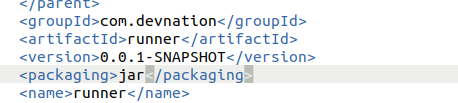
`Make sure your pom.xml also contain spring boot plugin`
```
org.springframework.boot
spring-boot-maven-plugin
```

### Step 3:-
Run command: `$ mvn clean package` from terminal
### Step 4:-
previous command will make target folder, in which contains two JAR
a. **runner-0.0.1-SNAPSHOT.jar** : This is executable JAR
b. **runner-0.0.1-SNAPSHOT.jar.original** : This is original JAR and not executable.
### Step 5:-
Suppose you have following pom.xml file in your spring boot project
```
4.0.0
org.springframework.boot
spring-boot-starter-parent
2.5.3
com.devnation
runner
0.0.1-SNAPSHOT
jar
runner
Demo project for runner
1.8
org.springframework.boot
spring-boot-starter
org.springframework.boot
spring-boot-starter-test
test
org.springframework.boot
spring-boot-maven-plugin
```
### Step 6:-
Run executable JAR as follows
**$ java -jar target/runner-0.0.1-SNAPSHOT.jar**
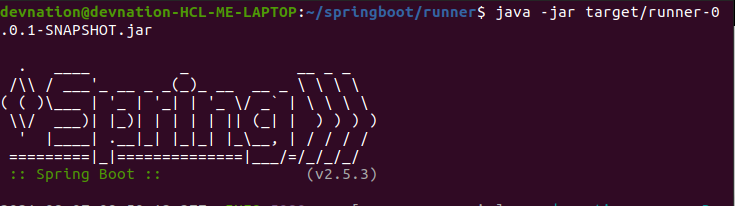
Server started.
### Conclusion:-
After performing above steps you made a spring boot nano app,which package and execute JAR and by making these app you get acquainted with spring boot basics about packaging and executing JAR .